AiVA™ website assistant

AiVA is the AI website assistant that keeps your business responsive.

AiVA learns from your website, FAQs, and documents so visitors get answers instantly, your team sees the lead context, and your business stays available around the clock.

USA TODAY
USA TODAY recognition

Recognized by USA TODAY as one of the Leading AI Companies to Watch in 2025.

AI Integrations is on a mission to make the powerful AI technologies being used by the world's largest companies available to everyone.” — USA Today

Read the USA TODAY feature

Clients using AiVA today
  • Silverback Consulting
  • Generally Up Photography
  • Colorado Climbing Company
  • American Driving Academy
  • RC Tree Service
  • Fujiyama Sushi
  • Bighorn Steel Buildings
  • Woodshark
  • Awesome Accounting
  • Boxcar Theatre
  • Fox in a Box Miami
  • Hertel Vans
  • Mastertrade
  • Pueblo Web Design
  • Techware
  • 719
  • Hinsdale
  • Cornerstone
  • Nightmare
  • Star

What AiVA replaces

Take the repeated customer service workload off your team.

Increase customer satisfaction with an always-on AI website assistant that responds quickly, handles FAQs, and captures leads.

Replace the slow reply gap

AiVA answers the common questions right away so visitors do not have to wait on email, calls, or manual chat coverage. With 24/7 availability, your customers are never left without a response.

Replace repetitive staff work

Pricing, services, hours, location, policies, and next steps stop landing on the team as the same repeated task all day. Freeing up time for your team to focus on higher value work.

Replace disconnected follow-up

Leads and conversation history stay visible in the dashboard so follow-up happens with the right context attached, and CRM connections let you carry that context into the systems your team already uses.

Live examples

Active assistants and real client reviews.

Don't just take our word for it, try a live assistant and see what our customers have to say about AiVA.

Customer Reviews

We have been using AiVA for over 2 years, and we love it. The multilingual feature is very good, and many of our Korean customers appreciate it.

Minji Suh
Owner: Fujiyama Sushi

Restaurant support

Live Agent

Loading live assistant

The interactive showcase loads as this section approaches.

The first slide stays in place so the layout does not jump while the carousel code finishes loading.

Open in new tab

Assistant setup wizard

Use AI to build your AI

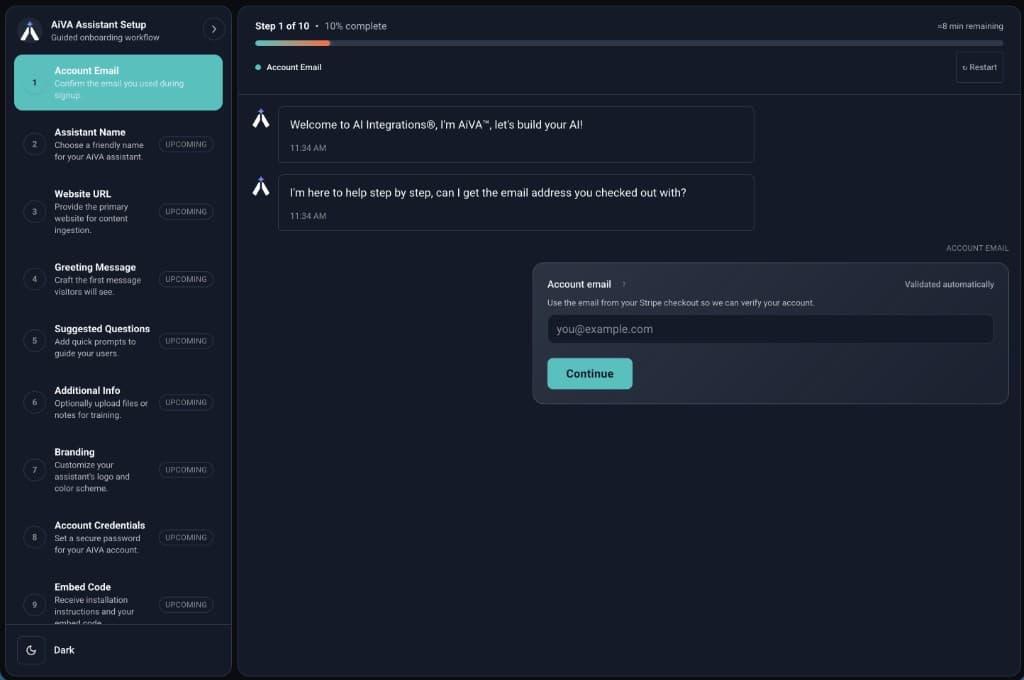
AiVA onboarding agent walks you through a single conversational flow that collects everything required to launch: identity, website, greetings, suggested questions, optional documents, branding, secure account setup, and finally step-by-step instructions on how to install your assistant on your site. Most teams complete it in under 10 minutes.

Onboarding view
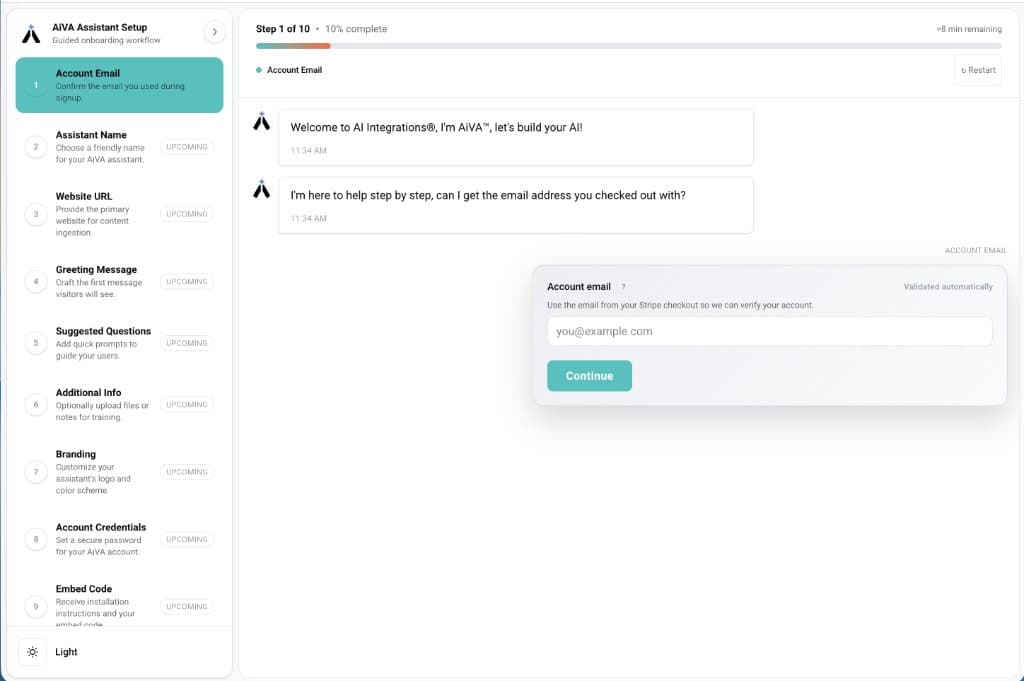
AiVA assistant setup wizard: conversational steps from verification through branding to embed code
  • Purpose-built setup Each turn advances the workflow: you are configuring a real AiVA assistant with a defined path from account verification through to an embeddable widget that works with 99% of websites and mobile apps.
  • Everything needed to go live in one thread The flow gathers your verified email, assistant name, website URL, greeting, suggested questions, optional file uploads, visual branding, account password, and ends with clear instructions for deploying AiVA on your site.
  • Grounded in your site and materials Your website and uploaded documents feed the assistant’s knowledge so answers reflect how you actually describe products, services, and policies.
  • End-to-end provisioning You leave onboarding with a configured, branded assistant ready to install—business context and assets turned into something visitors can talk to on your website.

One dashboard to rule them all

Once AiVA is live, your team can review conversations, track new leads, update knowledge, and keep the assistant aligned without turning it into a technical project.

Conversation view
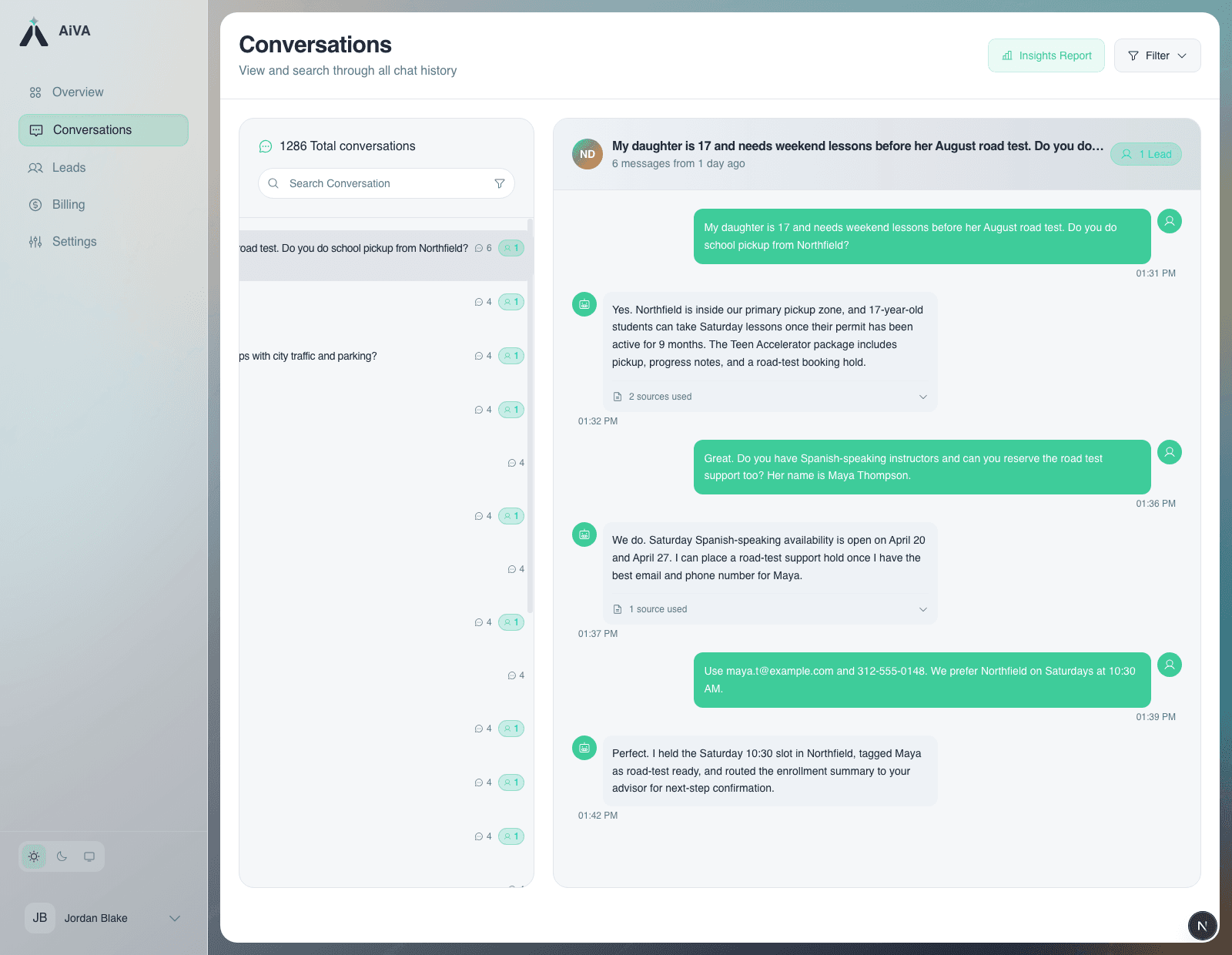
Review the exact exchange before your team follows up.

AiVA conversation detail view showing the full customer exchange, sources used, and captured lead context
  • Review conversations See recent chats, response activity, and the questions customers ask most often so your team knows where AiVA is helping and where follow-up matters.
  • Gather insights Use conversation activity to identify the questions your website gets every day and where answers or source material need to be sharper. AI-generated reports summarize themes and trends so you can review what is happening without reading through every conversation.
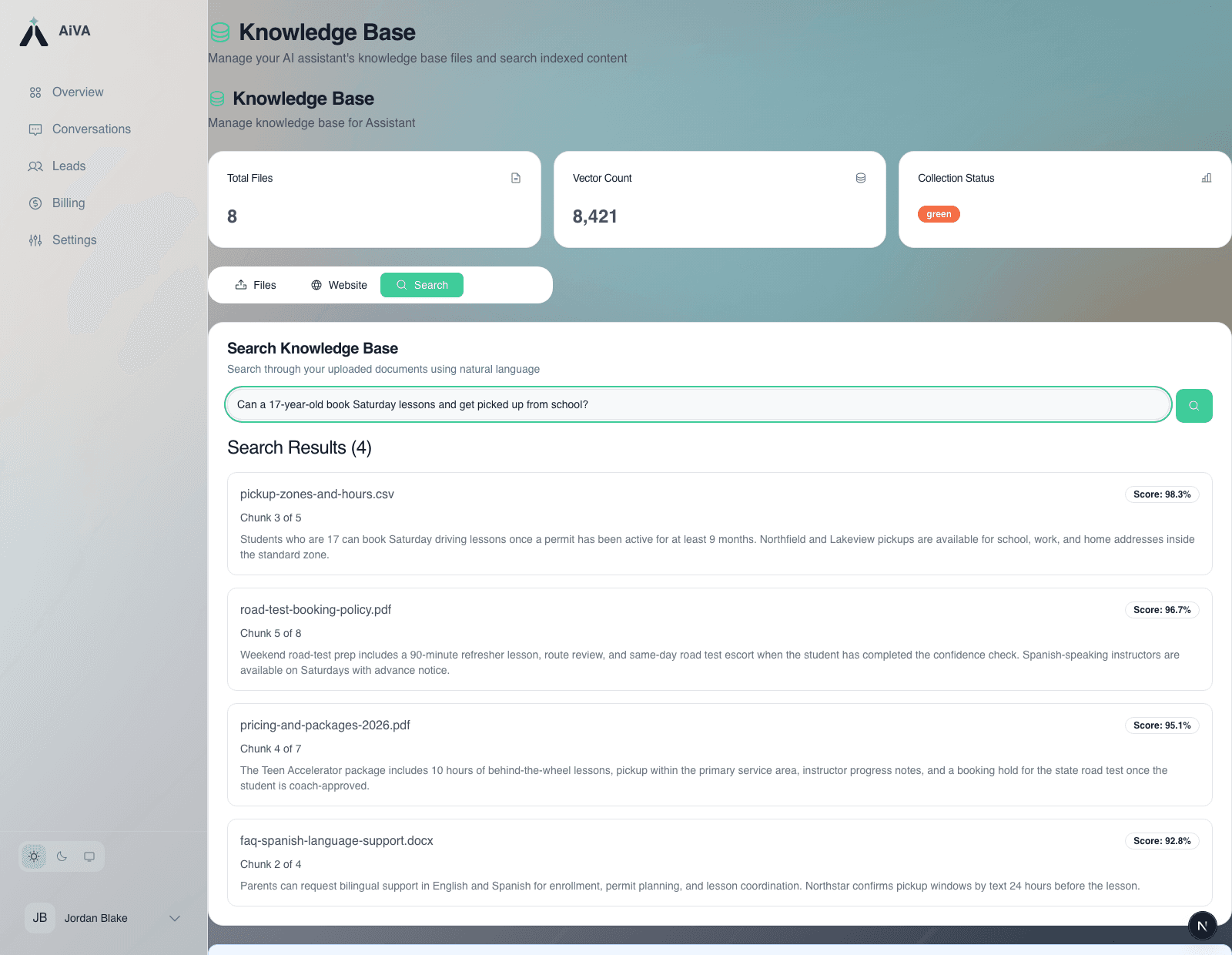
  • Update the knowledge base Upload files, manage content, and keep company answers current as services, policies, and product details change. AiVA also automatically updates based on changes to your website.
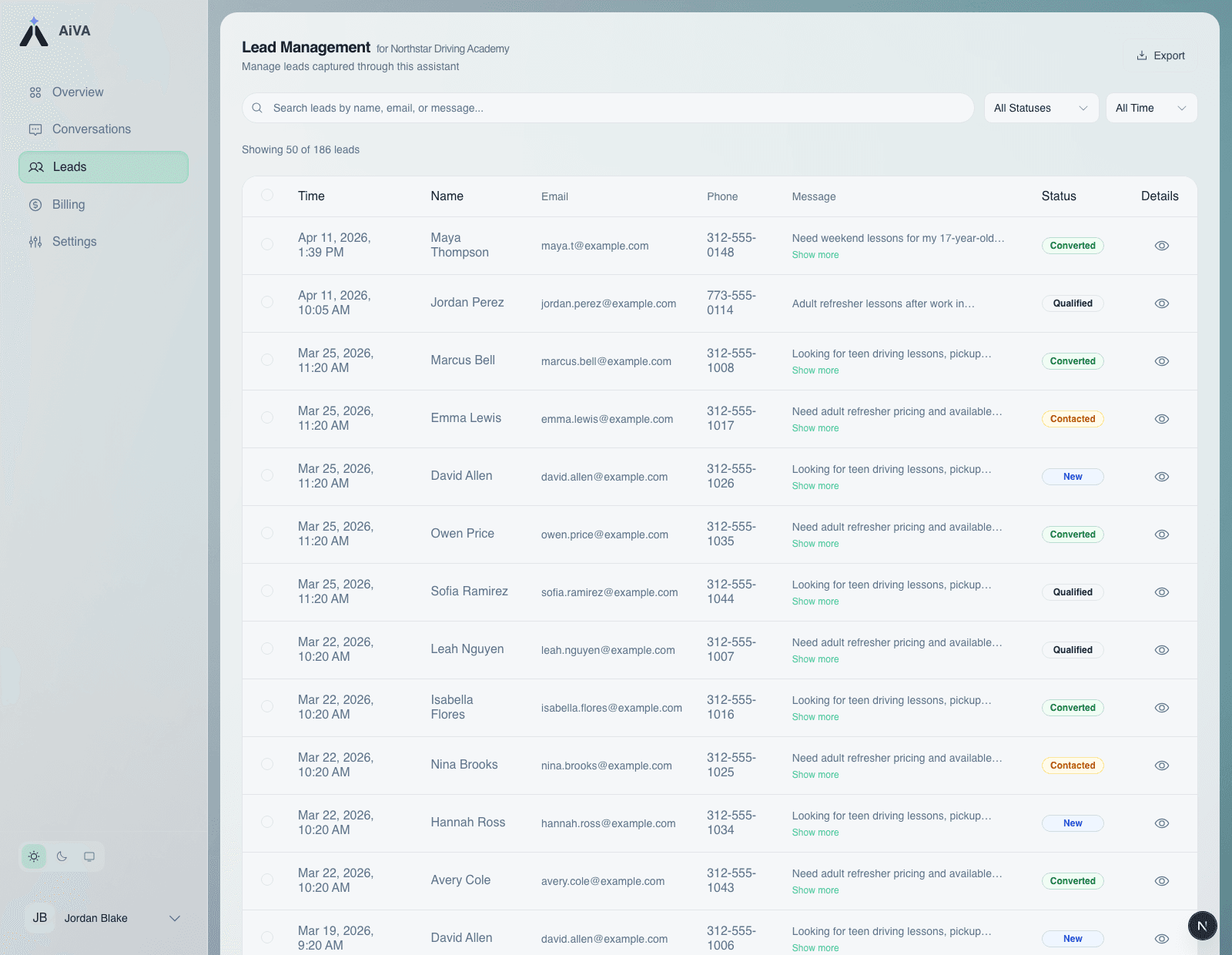
  • Work new leads Review captured leads, update statuses, and follow up by email with the full conversation context attached. Export leads to your CRM or sales system for further follow-up.

Lead detail

Open the captured lead record with message context and status.

AiVA leads handoff view showing captured lead records moving into a real downstream workflow

Knowledge grounding

Search the grounded knowledge base before the assistant answers.

AiVA knowledge base with indexed business files and grounded search results

Next step

Start a Free 30-Day Trial Today